Assimbly 3.0

Van modulaire software naar het modulaire bedrijf

Some say that version 2.0 is the real 1.0. But where is Assimbly 2.0? From 0.1 till 1.9 this versioning scheme was closely followed. So why the ‘Microsoft-like’ move to go directly to 3.0? The version 3 number reflects 3 things:

1. Apache Camel 3

Assimbly moved to Apache Camel 3 (3.3 at this time). Camel 3 brings many improvements around the framework as Claus Ibsen blogged on the Camel website.

2. Jhipster 6

One of the biggest changes is the move of the web framework Jhipster from version 5 to 6. This updates Spring Boot, Angular and hundreds of other libraries.

3. New features

With both the latest Camel as Integration Framework and JHipster as Web Application Framework it feels like Assimbly is standing on the shoulder of giants. From there we can easily add new functionality as described later in this blog. First we shortly discuss what Assimbly does.

What is Assimbly?

Almost anyone needs data from multiple systems. Apache Camel is the most powerful integration framework in the world. It supports many protocols and has extensive documentation. It’s a perfect solution to integrate systems with each other.

One common way to create an integration is by using the Camel DSL (Domain Specific Language for writing integrations). Like for example send something from a database to a webservice. The Camel DSL makes it a lot easier to write such integrations:

from(“sql:select order from table”).to(“https://orderservice.com”)

It’s however not that easy. As you first need a CamelContext to run such routes. The context as well as the route needs to be configured. The route is wrapped in a Java class, some error handling is needed, some options are needed etc. Last, but not least the route needs to be managed (start, stopped, paused etc).

What if you don’t need to write the integration, but just configure and manage the integration in your browser?

No Java, no Maven, no IDE and no deployment. In Assimbly you can do everything within the browser. An example of SQL to HTTPS will look in Assimbly like this:


Assimbly focuses on connecting applications and other software. These are just connecting endpoints, while leaving other software (middleware, applications, databases etc) handle other application or integration logic. This makes connecting software easier for intergration specialist as well as less technological users.

What’s new?

Here is a high level overview of what’s new in version 3.0.

GUI

In Assimbly a flow connects multiple endpoints with each other. The flow page lists all these flows of the gateway. This page used to have buttons for managing flows and text with extra information about the flow.

Old flows page:


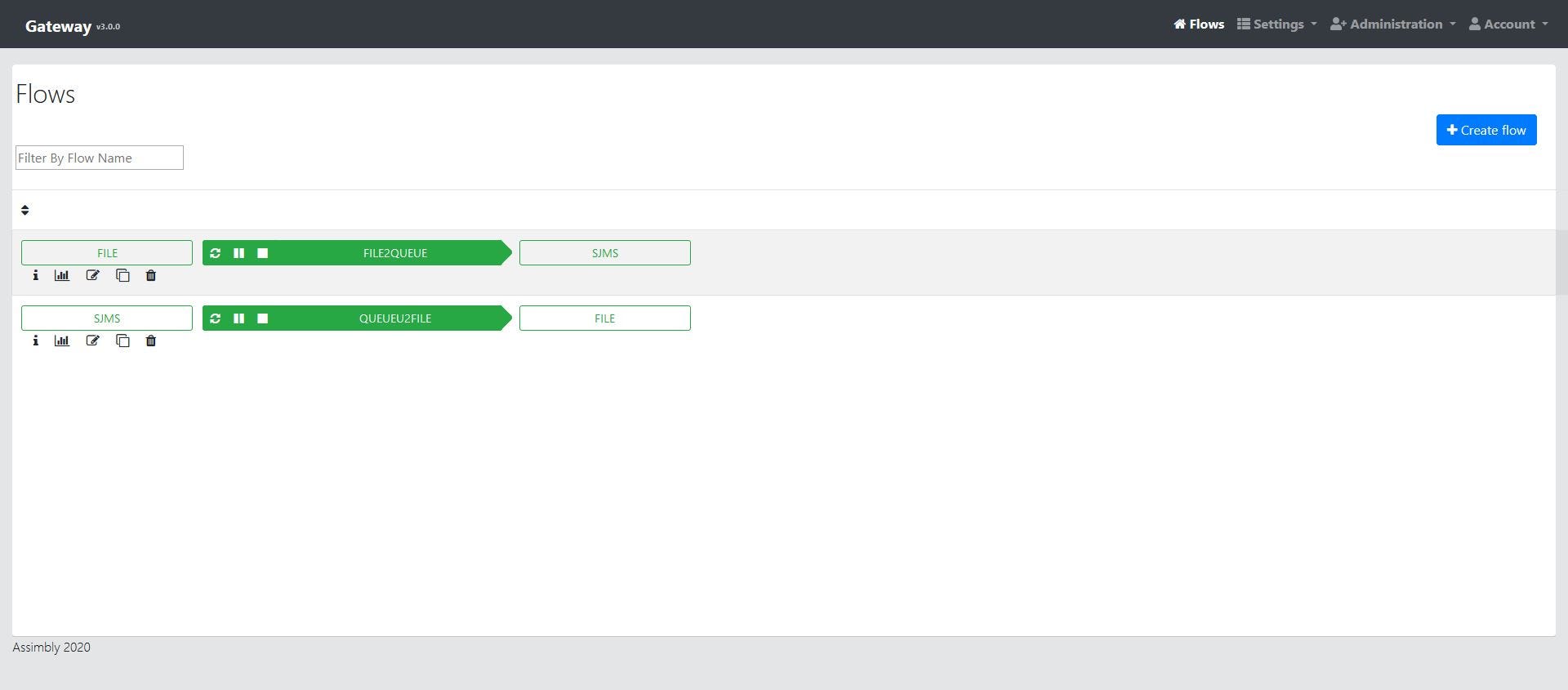
Now these two are combined to give a clearer look. Also, basic actions like getting stats and cloning, editing or deleting a flow can be done directly from this page.

New flows page:


Upgrades

Camel recently released version 3. The Assimbly Connector API is an interface on top of integration software like Camel and ActiveMQ. This API could support both Camel 2 and 3, but since there aren’t a lot of compatibility issues we decided to support version 3 from now on as the only option.

For Assimbly the main benefits are performance improvements, lower footprint, more components and support for Java 11. In the future we hope to benefit from the more modular approach of Camel 3.

Jhipster is a great framework to generate web applications. Often you only get frameworks that are part of the web application. For example the backend, the database, the frontend, the user interface and so on. Jhipster brings them all together. This leads to a full-functional web application, but also to well-structured code. With Jhipster 6 we moved to:

  • Spring Boot 2.2
  • Angular 8
  • Swagger UI v3
  • Gradle 5

These frameworks and hundreds of other library upgrades brings Java 11 support, performance improvements and better security.

Upgrading those libraries with Jhipster saves a lot of manual work, however it is also quite hard because this upgrades all libraries at once. This broke our custom code that we of course want to keep. So a lot of debugging needed to be done. Thanks to Achraf Adbib for making this happen!

Within Assimbly DocConverter (which is a subproject of Assimbly) is used for converting between different data formats. This let users define flows in XML, JSON and YAML.

In version 3.0 it also allowed calling DocConverter from a flow with special headers with a flow (as explained in the documentation). This converts the data format of the input message to XML, JSON, CSV or YAML.

Startup improvements

With all the updated frameworks we can now support Java 11, the latest long term support version of Java. In the old days of the Java world only Oracle’s Java JDK was used (and sometimes you saw IBM’s JDK). In the last few year we see a faster pace of versions and more builds. You can read more on my article on Java JDK’s.

In the old version Assimbly was only running well on Oracle JDK 8, but it was slow. With all the framework upgrades, startup fixes and JDK 11 we saw major improvements on startup time. Here are some stats on the several JDK’s:

Assimbly 1.8.0 (Jhipster 5 / Camel 2)

Jar Size: 300 MB

JDK                         Fastest startup time MemoryJDK 8 (231)               77 seconds              1610  MB
OpenJDK 11 (11.0.6) Did not run
OpenJDK 14 (14+36) Did not run
OpenJ9 11 Did not run

Jar Size: 220 MB

JDK                        Fastest startup time   MemoryJDK 8 (231)              13 seconds                1805 MB
OpenJDK 11 (11.0.6) 16 seconds 215 MB
OpenJDK 14 (14+36) 16 seconds 220 MB
OpenJ9 11 17 seconds 205 MB
GraalVM 8 (20.0) 14 seconds 1840 MB
GraalVM 11 (20.0) 14 seconds 1280 MB
Azul Zulu 8 13 seconds 1696 MB
Azul Zulu 11 13 seconds 995 MB
Azul Zulu 14 12 seconds 553 MB
Amazon Correto 8 13 seconds 1716 MB
Amazon Correto 11 14 seconds 976 MB

So in the new version Assimbly is running on any JDK without problems. Azul Zulu 14 had the fastest startup and OpenJDK 11 (hotspot) the lowest memory footprint. A native image was also created for Assimbly, but that only gained 1 or 2 seconds. This will probably improve when Spring Boot will have official support for Native Image.

Other enhancements

In Assimbly headers can be set as one or more key/value pairs. This group of headers can be (re)used within multiple flows.

The header value can be either set as constant, but now also from an expression (simple, groovy, xpath and jsonpath are supported).


Besides Apache Camel, Assimbly supports ActiveMQ. Both ActiveMQ Classic as ActiveMQ Artemis are supported. Flows can send or receive messages from ActiveMQ. The broker can be configured from within the browser.

Assimbly is designed with several layers in mind. At the lowest layer there is the implementation of Apache Camel and Apache ActiveMQ. On top of that there is a Java API to configure and manage Camel and ActiveMQ.

Currently, Camel 3 is the only flow implementation as Apache Camel fulfills all our needs. It’s however possible to write a custom implementation or to use other integration frameworks like for example Spring Integration. In Assimbly 3.0 the Java API, Assimbly connector, is enhanced to use 68 methods.

Assimbly connector can be seen as a convention-over-configuration library for Camel. It starts the CamelContext with things like the catalog, registry and ssl support. The connector can also be used separately from Assimbly gateway (the web application).

For example to embed in a command line application or other middleware like I recently did with Apache NiFi.

Assimbly comes as a single ‘fat’ jar file which runs on any server or laptop. The project also supports docker:

docker pull skin27/assimbly:latest

Several logging improvements has been done. Firstly the logs on startup were improved. The logged printed previously only the URL were Assimbly was running, now it prints lots of extra information like startup time, java version and so on.


Overall there is more logging for example when importing/exporting flows. It’s also now available to set the loglevel to debug or trace the flow.

Current JDK versions already support most common TLS certificates. It’s however possible to whitelist extra URL’s or upload certificates manually.

These certificates are managed centrally. This means even when there are multiple instances every instance gets all the certificates. These certificates are automatically loaded in flows.

Documentation

In Assimbly we provide contextual documentation. This means when a user selects for example the ‘File’ components it gets

  • A link to the official Camel documentation about the File component.
  • A link to the Assimbly documentation with additional examples and screenshots.
  • Placeholders for the URI syntax.
  • Info on the URI syntax in an info box.

The Assimbly wiki has now more than 50 articles. Including a quick start guide and tutorials.

What’s next?

Experimental features

We are now working on new experimental features in 3.1 (Currently alpha status):

  • Support for all Camel components
  • Modularization
  • Microservices: Running Assimbly on Kubernetes

Read more in a separate blog.

Community

Our hope is that people find Assimbly 3.0 useful. As an open source project everyone is welcome to create or discuss issues on Github.

Please star the repo on Github when you like Assimbly.

Using Camel and NiFi in one solution

Both Camel and NiFi are Apache projects. Their code is mostly written in Java and both are targeting data processing and integration. However, there are also many differences. One difference is that NiFi is a platform and Camel a framework.


For NiFi it means that it’s a software solution where you centrally build dataflows. The concept of dataflows let you take multiple processors to process data. Together processors form a dataflow. NiFi has around 200 processors, most of which are built-in.

Camel is mostly used at a code level. On the top of the framework companies have build platforms like for example Talend ESB or Red Hat Fuse. However, you can just as easily use it in your own application code or build an API, an integration or a microservice.

Camel supports all kind of integration patterns and components. A developer can take the core-engine of the framework and can add more than 300 components to it. The components and patterns together form a route.

Combining superpowers

Both projects provide a lot of powerful concepts, patterns and processors. Between the 200 processors and 300 components there is a quite some overlap. Still, no software in the world support all libraries, protocols and technologies. What if these superpowers could be combined?

There is currently no NiFi component in Camel and no Camel processor in NiFi. The difficulty is that both have implemented lots of protocols, but they don’t provide one for external parties. It’s like having a gasoline and an electric engine. They can work together in all kind of hybrid ways, but it’s not easy to combine them.

The example

Let’s explore a hybrid solution for NiFi and Camel. As an example we use a very simple, hello world-like, use case:

Moving files between directories.

As source directory we use C:\in and as destination C:\out

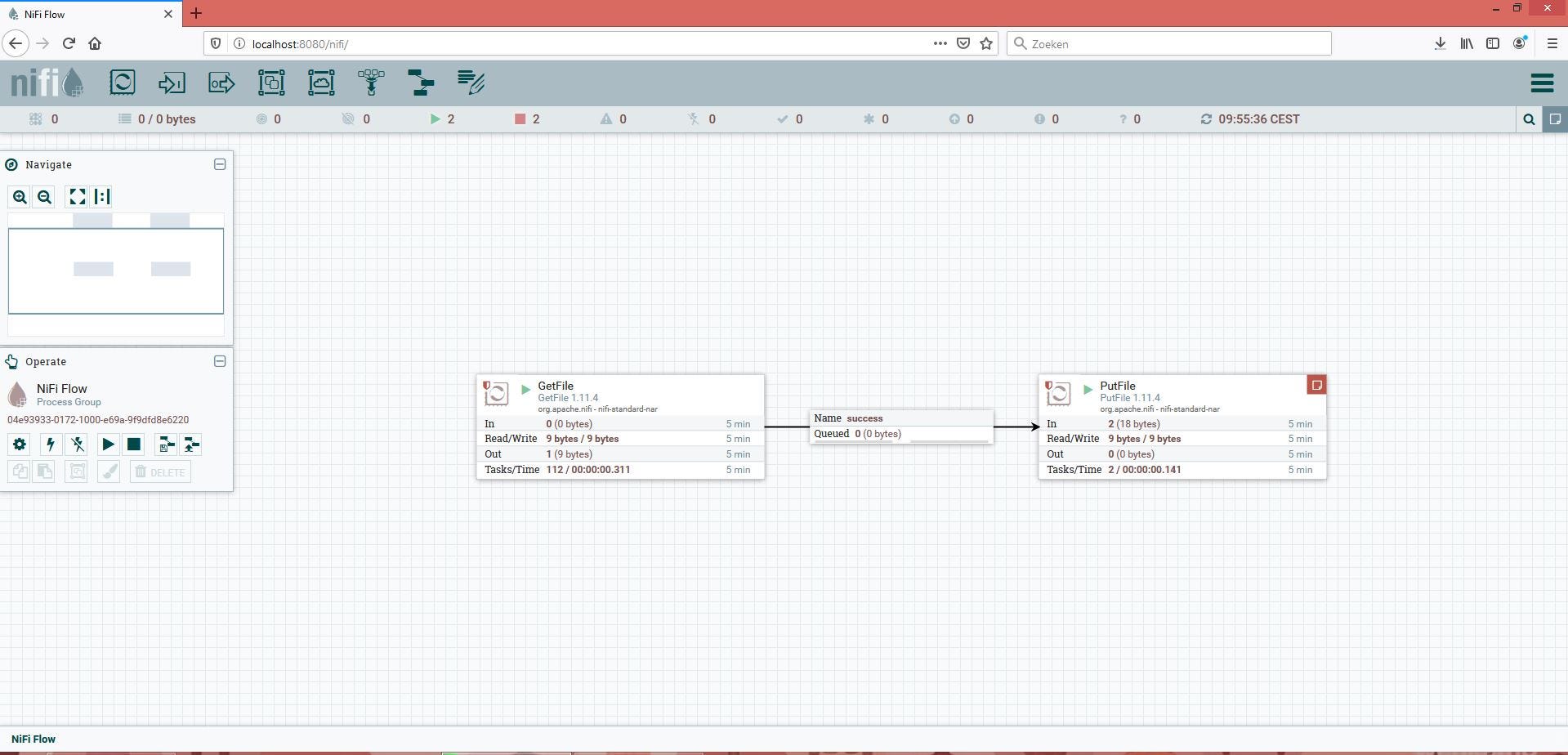
How would one create a pure NiFi solution? Well, just use the GetFile and PutFile processor:


And how would this work in Camel? This can be done by using the Camel DSL:

from(file://C:/in).to(file://C:/out);

Both provide a simple and sufficient solution. Nobody would complicate things by using multiple technologies. But to keep things simple this is exactly what we will do 🙂

Keep in mind that there are many more complex situations where it makes sense to use both. We’ll come back to that later. First we will create a demo to combine Camel and NiFi in one solution. We do this on a software (tooling) and a code level.

One solution on software level

We’ll continue with our simple example of moving files between two directories. To investigate a solution on a software level we shall not code. Only software components are being used.

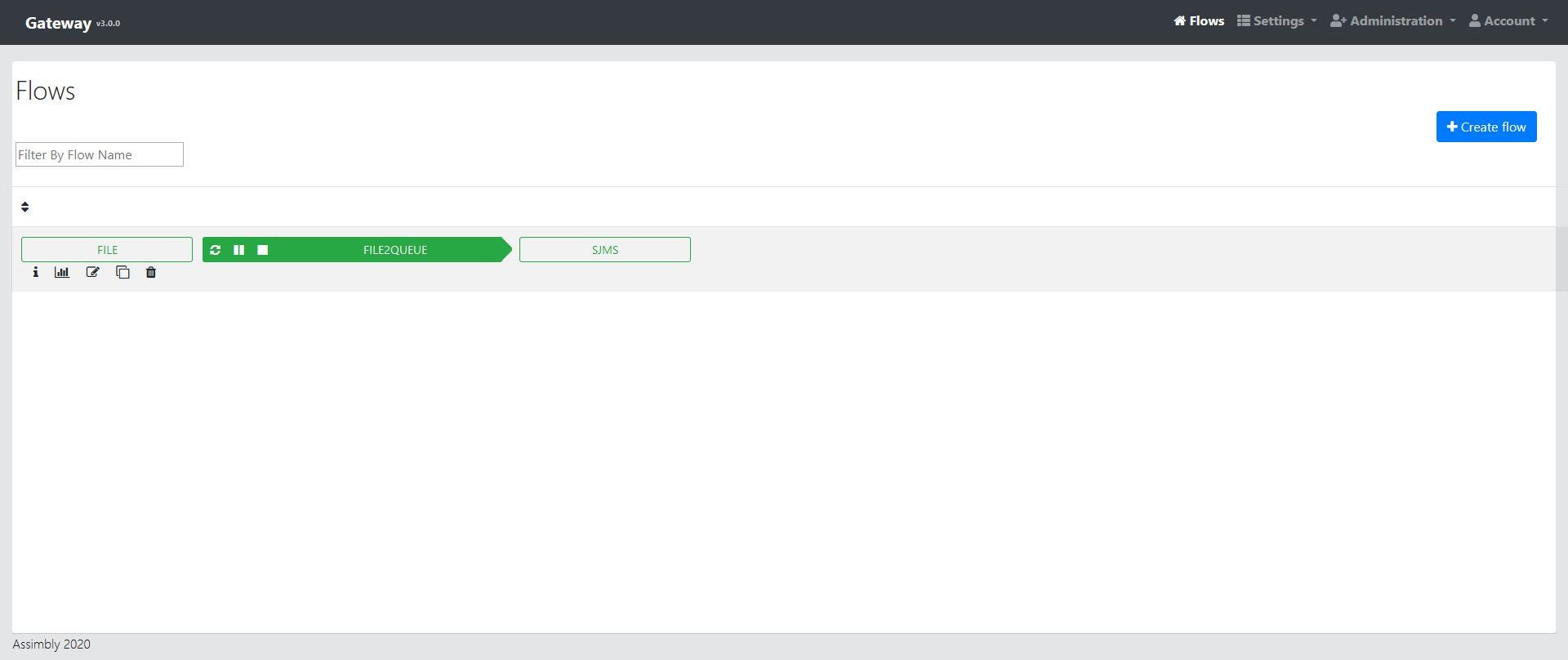
In NiFi the normal approach is creating flow with the user interface. As we don’t want to code our Camel Route too, we use Assimbly Gateway to configure the route in a browser. Assimbly allows to create connections with Camel and ActiveMQ.

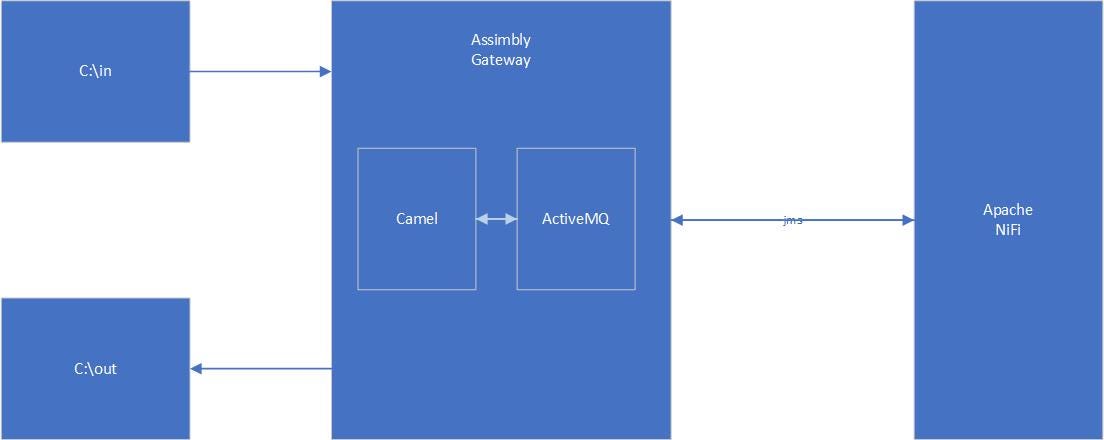
Next step is to find a matching protocol to connect both technologies. A good candidate is to use JMS. Both are well-supported by both Camel and NiFi. Here is the combined flow:


Let’s check the JMS example in more detail.

  1. Camel

The Camel route running in Assimbly picks up a file from C:\in and puts it as a message on the JMS Queue “in” on ActiveMQ (also running in Assimbly).


You can find out how to run this Assimbly flow with Camel and ActiveMQ on the Assimbly wiki. There is a quick-start and also a tuturial on message queueing.

2. NiFi

Apache NiFi gets the message from the queue ‘in’ with the ConsumeJMS processor and publishes it on queue ‘out’ with PublishJMS processor.

To accomplish this, we first create a controller service for JMS:


The ActiveMQ Artemis client library (JMS Client Libraries) is downloaded directly from Maven.

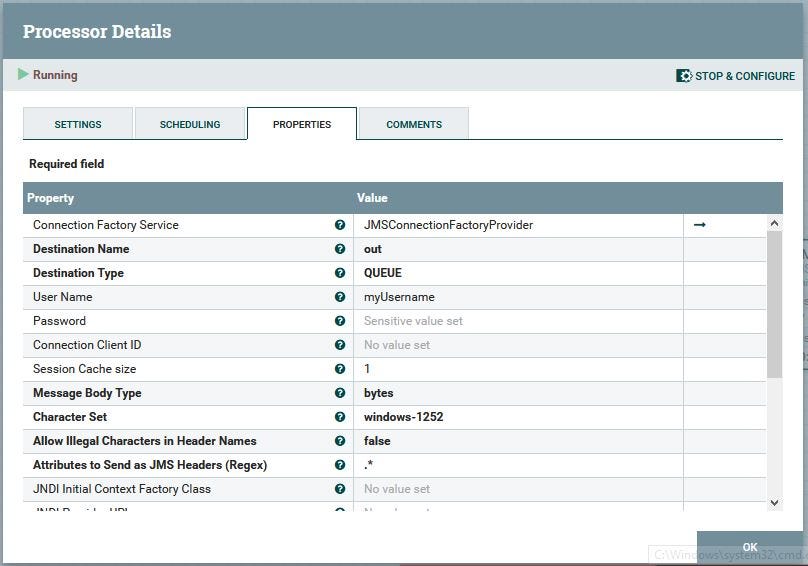
Next step is to configure the ConsumeJMS processor:

And the PublishJMS processor:

Last, but not least, we start the flow:

3. Camel

Another Assimbly flow let Camel consumes the file from the queue ‘out’ and saves it into the directory C:\out. For this flow we clone the first flow and configure it in reverse:

When testing the flow it still functions the same way as NiFi or Camel did on their own, but now combined in one solution.

More complex stuff

You can choose this setup in more complex situations because of:

  • Separation of Concerns: let NiFi run flow logic and Camel run the connections (without the need of applications doing a lot of integration).
  • Let NiFi work centrally and Camel distributed.
  • Enhances functionality: NiFi processors and Camel’s components.
  • Have a clear transport layer (MQ).

It’s possible that completely different teams or engineers work on either of those tools.

Other options

Our example used JMS, it’s of course possible to use other protocols. For example let Camel post a message with the HTTP component and let the “HandleHttpRequest” processor of NiFi handle this request. Then NiFi posts the message with the invokeHttp processor to the “Jetty component” hosted by Camel that saves the message to file.

There are many other possibilities to use both NiFi and Camel (through Assimbly Gateway) together. For example use Apache Kafka broker with topics as broker instead of ActiveMQ. Or to use their REST interfaces. The key point to take is that here you can have separate-of-concerns and this setup support all kinds of use cases.

One solution on code level

Like Camel, NiFi can be extended with Java code. This is done by creating a custom processor or service controller. There has been some discussion in the NiFi community to use Camel code within NiFi processors. This is reflected in the Jira issues:

nifi-924 and nifi-1842

and also on the mailing list

This has not been materialized yet and there is not a lot of code to find on this topic. Therefore, I created two experimental custom NiFi processors which combines NiFi and Camel code.

How do they work?

As a first step we create a custom NiFi processor. There is an excellent guide for this written by Shubam Gupta. This takes a maven archetype to generate a default custom processor.

With this guide we create a new ‘ConsumeWithCamel’ processor. We add the following properties:

  1. From URI (the URI of the Camel component for consuming)
  2. Error URI (The URI of the Camel component for errors)
  3. LogLevel (The loglevel to the NiFi log of the Camel component).

Then we add the Camel code that:

  1. Starts a CamelContext
  2. Configures the route
  3. Creates a consumer template

We let Assimbly Connector handle the Camel code. This API is used in Assimbly Gateway as well. It uses a convention over configuration approach and already has a lot of Camel components (like the File component) built-in.

Here is the code used when starting the NiFi processor:

@OnScheduled
public void onScheduled(final ProcessContext context) {//Use Assimbly Connector to manage Apache Camel (https://github.com/assimbly/connector)
     getLogger().info("Starting Apache Camel");
        
        //Start Apache camel
        try {
          startCamelConnector();
        } catch (Exception e2) {
          getLogger().error("Can't start Apache Camel.");
          e2.printStackTrace();
        }  //Create an Assimbly flow ID
  UUID uuid = UUID.randomUUID();
  flowId = context.getName() + uuid.toString();       //configure the flow (Camel route)
        try {
           configureCamelFlow(context);
        } catch (Exception e1) {
          getLogger().error("Can't configure Apache Camel route.");
          e1.printStackTrace();
        }
        
       //start the flow (Camel route)
        try {
          connector.startFlow(flowId);
        } catch (Exception e1) {
         getLogger().error("Can't start Apache Camel.");
         e1.printStackTrace();
        }        
        
     //Create the endpoint
     try {
        template = connector.getConsumerTemplate();      } catch (Exception e) {
         getLogger().error("Can't create Apache Camel endpoint.");
        e.printStackTrace();
      }
        
  }

Last step is to get the messages from Camel with the help of the consumerTemplate and pass it through to the NiFi Processor.

The code to process a message:

@Override
public void onTrigger(final ProcessContext context, final ProcessSession session) throws ProcessException {//Get the message from the Camel route
Object output = template.receiveBody("direct:nifi-" + flowId);if ( output == null ) {
            return;
}
     
FlowFile flowfile = session.create();// To write the results back out to flow file
flowfile = session.write(flowfile, new OutputStreamCallback() {@Override
public void process(OutputStream out) throws IOException {
           out.write(output.toString().getBytes());
       }
});session.transfer(flowfile, SUCCESS);}

You can find the complete code on Github.


ProduceWithCamel

Next we create another custom Nifi Processor: “ProduceWithCamel”. This is similar to the consume processor, but it works in the reverse direction. For this we’ll use a producerTemplate to produce the messages. The code for this processor you can find here.

Note: These are experimental processors created only for this demo.

Testing the code

To test the code you can download the ConsumeWithCamel processor and also the ProduceWithCamel processor. Both NAR files are put into the lib directory of NiFi.

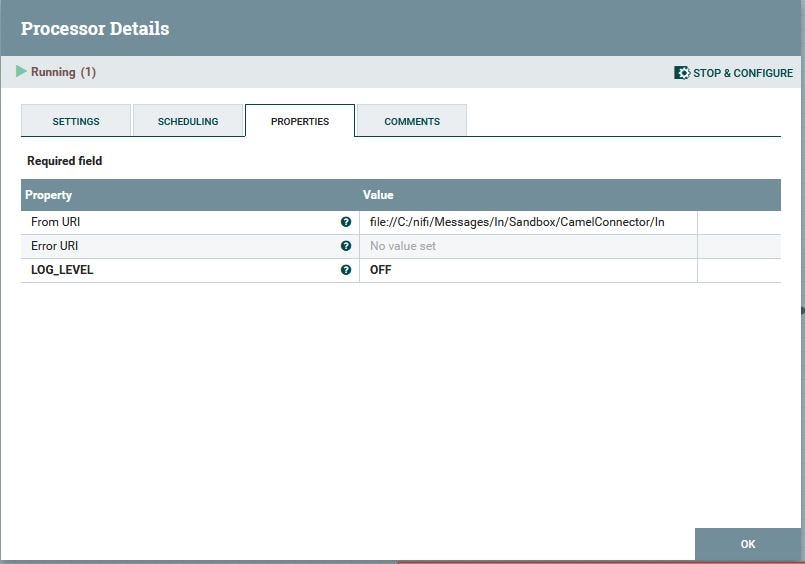
Now we can use the new Consume processor and configure it:

The Error URI is empty, which mean errors will be logged to the NiFi log file.

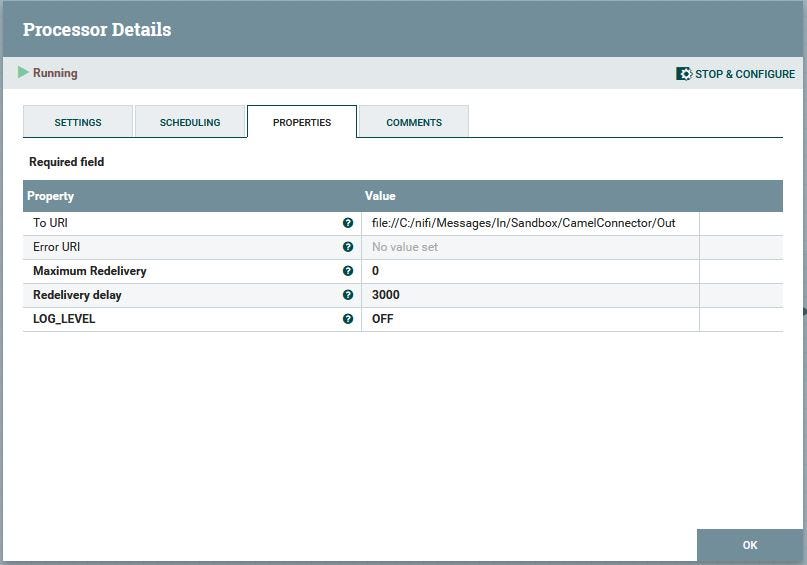
Secondly we configure the produce processor:

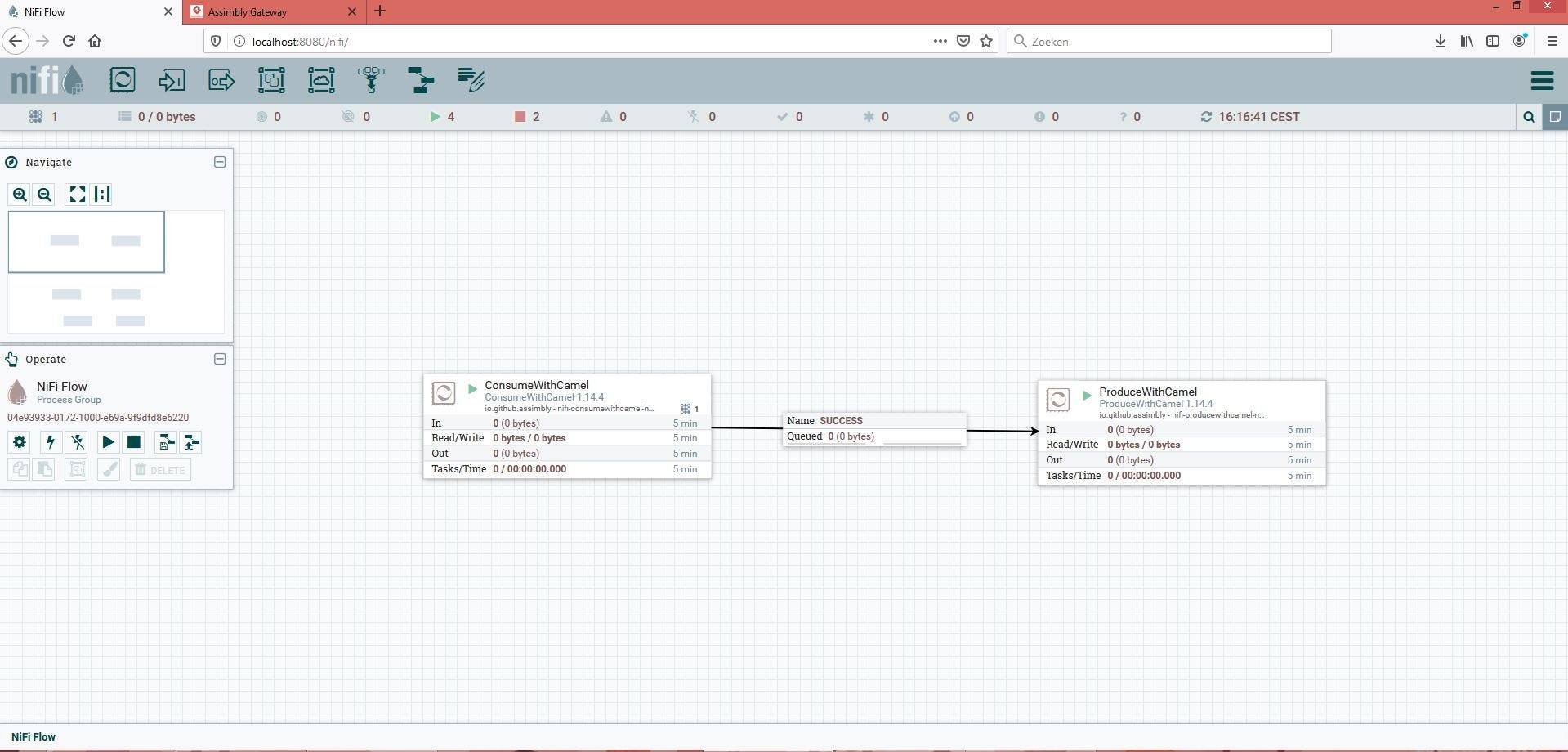
Finally we connect both processors with each other and start the flow.

The file will be picked up and stored just like in all other examples.

More possibilities

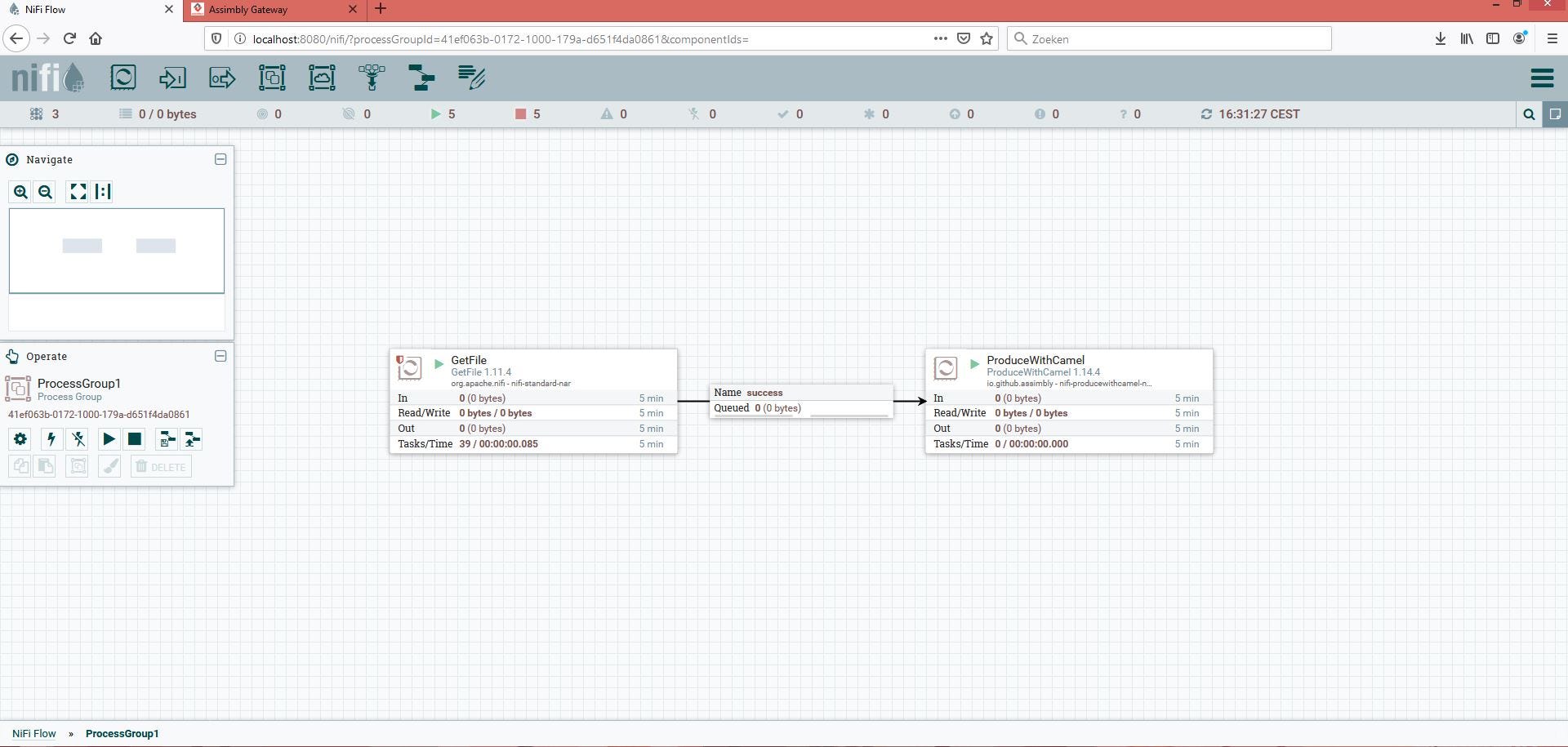
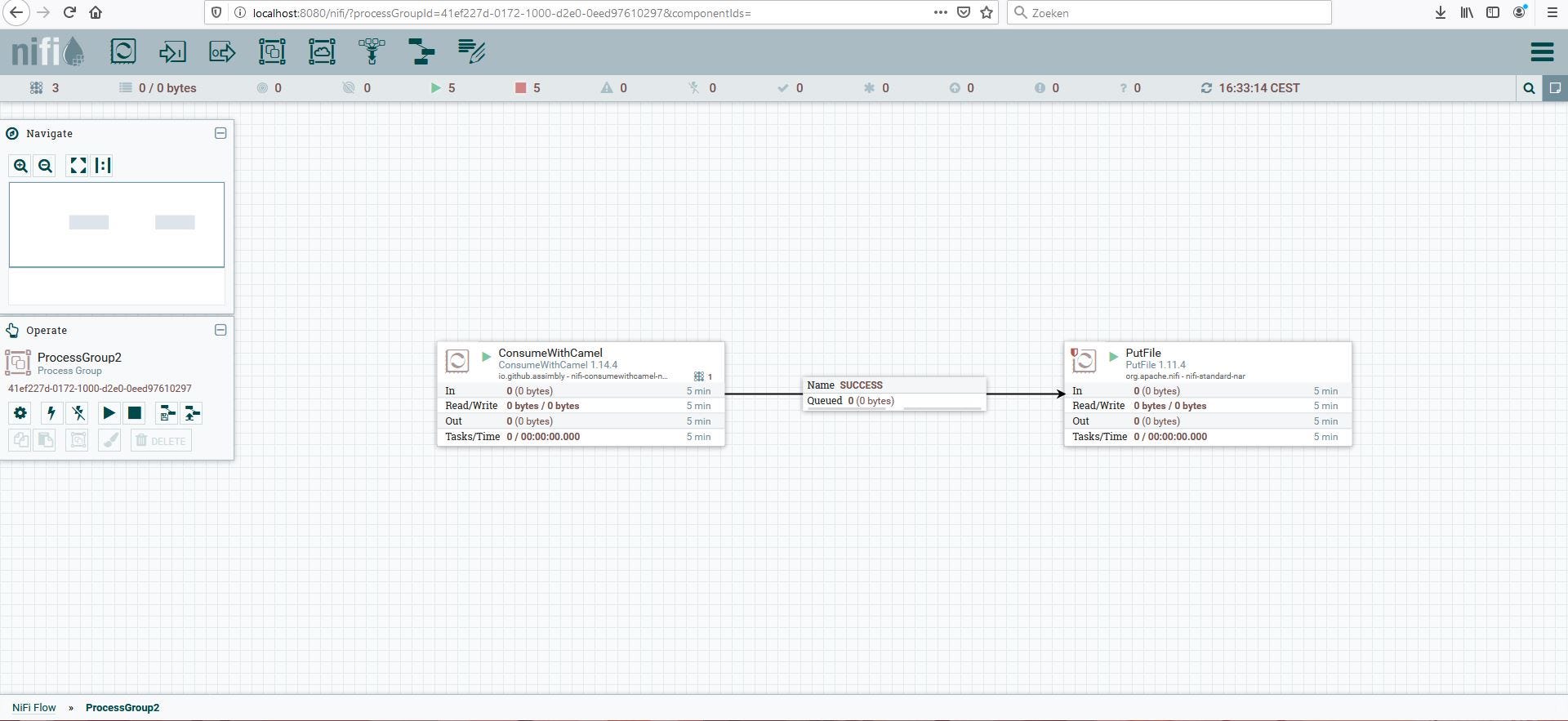
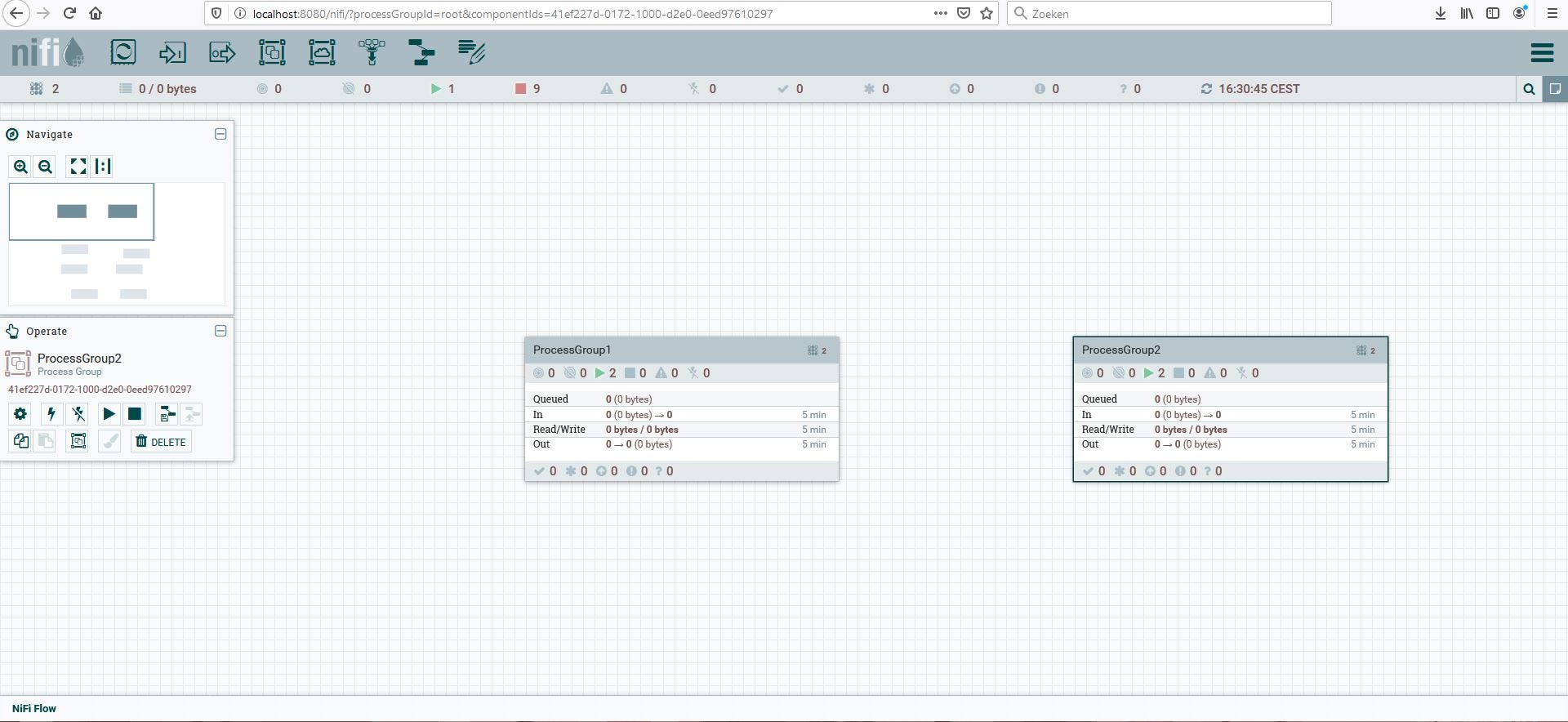
Just like using tools, the code solution also creates all kinds of possibilities. For example dataflows aren’t loosely coupled. So you always need to connect processors or process groups. When creating two process groups now you loosely couple with Camels’ VM component.

The first process group uses the producewithcamel with the URI vm://secondProcessGroup

The second process group consumes this message:

Now both flows move the file from one directory to another, but the process groups aren’t connected as usual. The new solution acts like a ‘wormhole’.

Though every example had the same result, there were many paths. Within integration it’s good to use open source as well as an open mind. Together they’re unstoppable on whatever path you are on.